If your team works with customers in shared Slack channels, a lot of your most important conversations happen there: feature requests, renewal questions, escalations, quick "can we move the call?" messages. Attio records your emails and meetings automatically, but none of those Slack conversations reach it. Anyone who opens the customer's record in Attio sees half the relationship.
There are four ways to fix that:
- Copy and paste the important conversations into Attio notes by hand.
- Use a dedicated app that logs Slack conversations to Attio for you. We'll look at Recordkite, which is built for exactly this.
- Build a workflow with Zapier, Make or n8n that sends Slack messages to Attio.
- Use Pylon, a B2B customer support platform with an Attio integration.
This guide walks through how each one works, what it costs you in time and money, and when it's the right choice.
The short version: copy and paste is fine for a few channels and the occasional important message. A dedicated app like Recordkite is the low-effort option if shared channels are where you actually work with customers and you want every conversation summarised on the right record. A Zapier, Make or n8n workflow suits teams who want to automate cheaply and are happy to build and maintain it. Pylon makes sense if you already use it, or want it, for customer support.
Why Slack conversations don't show up in Attio
Attio builds your relationship history from emails and calendar events. Once you connect your mailbox and calendar, every email and meeting with a customer is logged to their company and people, and the Last interaction attribute updates on its own.
Slack isn't part of that. Attio does have a Slack app, but it works in the other direction: it posts record changes and workflow messages to Slack, and lets you ask Attio questions by tagging @Attio. It can't read the messages in your channels, so nothing said in Slack ends up in Attio.
What good looks like
Before comparing the options, it helps to be clear about what you want from logging Slack conversations in Attio. Most teams want:
- The right record. Conversations on the customer's company, and ideally on the people who took part and any open deals.
- Something readable. One entry per conversation, not one per message, so the record doesn't fill up with "thanks!" and "👍".
- Context at a glance. A short summary of what was discussed and what happens next, with a link back to Slack for the detail.
- A last-contact date. Attio's Last interaction only counts emails and meetings, so you need your own date to sort and filter customers by when you last spoke in Slack.
- Little ongoing effort. If it relies on people remembering, it won't last.
- Care with customer data. Shared channels can include sensitive conversations, so it matters where messages go and how long they're kept.
Keep these in mind as we go through the options.
Option 1: Copy and paste into Attio notes
The simplest option needs no tools at all. When something important happens in a shared channel, someone copies it into a note on the customer's record in Attio.
How to do it
- In Slack, hover over the message (or the first message of a thread), click the ⋮ menu and choose Copy link.
- In Attio, open the customer's company record and create a new note.
- Give it a title that says what it's about, paste or summarise the conversation, and paste the Slack link so anyone can jump to the full thread.
- Mention the colleagues who need to know with @, and add any follow-ups as tasks.
If you want a last-contact date, create a Last Slack interaction date attribute on companies and update it by hand when you add a note. Attio's note templates help keep everyone's notes in the same format.
Pros
- Free and available on every Attio plan.
- No setup, and nothing new to approve or secure.
- People choose what's worth logging, so the record stays focused.
Cons
- It depends on people remembering, and they don't, especially on busy days.
- It takes time: finding the record, writing a summary and copying links adds up across many channels.
- Coverage is patchy. You only see the conversations someone decided to log.
- Nothing appears on the people involved or on deals unless someone adds it there too.
Best for: teams with a handful of shared channels, where only the occasional conversation needs to reach the CRM.
Option 2: Use a dedicated app (Recordkite)
Recordkite is an app built specifically to log conversations from Slack Connect channels to Attio. Instead of a workflow per channel, you add it to the shared channels you want logged and choose the Attio company for each one.
How it works
- Connect Attio and Slack to Recordkite.
- Add Recordkite to a shared channel by typing
/invite @Recordkite. Everyone in the channel, including the customer, can see it's there. - Map the channel to an Attio company. Recordkite suggests one from the email domains of the people in the channel.
- Recordkite logs every new conversation in the channel from then on, and links the people in it to their Attio records.
Rather than writing one entry per message, it groups messages into conversations: a thread is one conversation, and other messages are grouped by topic using AI.
What you get in Attio
- A summary note on the company for each conversation, with an AI summary, any next steps, who took part and a link back to Slack. Works on every Attio plan.
- A Slack conversation activity on the Activity tab of the company, the people involved and any linked deals. This needs Attio Pro or Enterprise, because Attio only lets apps add their own activities on those plans.
- A Last Slack interaction date on companies, people and deals, so you can sort, filter and build views on when you last spoke in Slack.
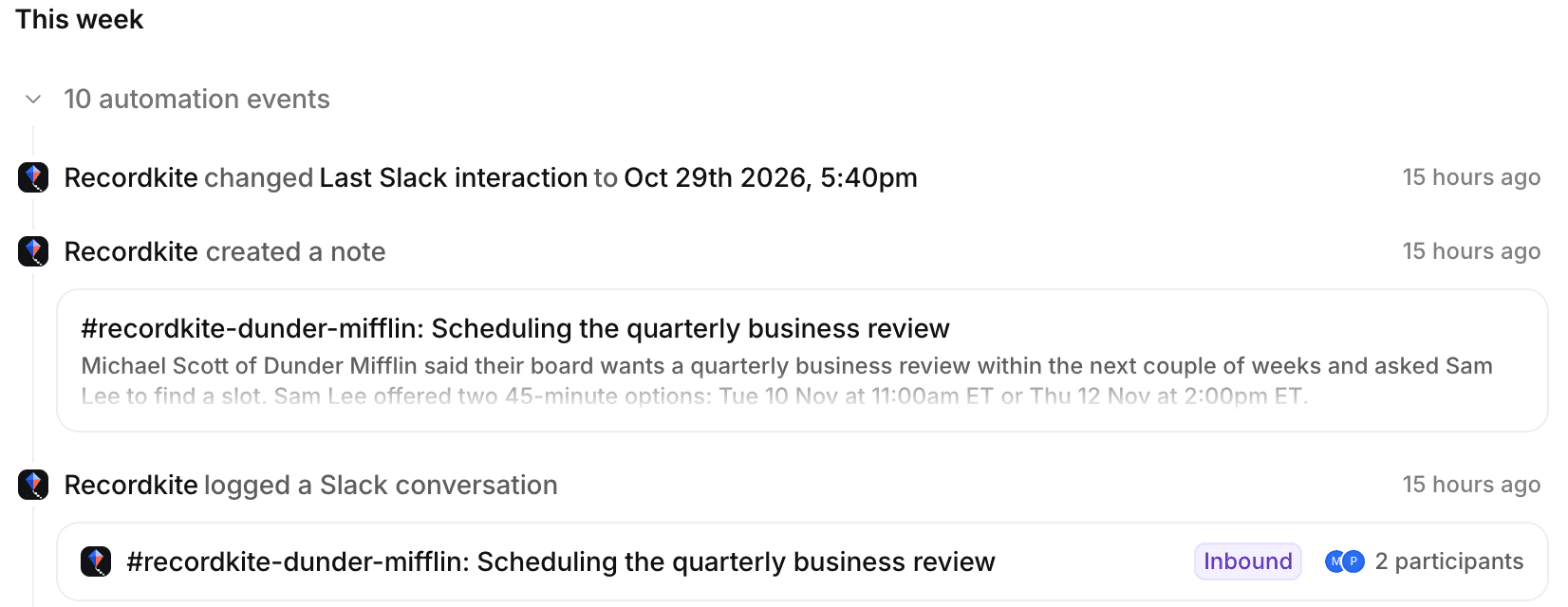
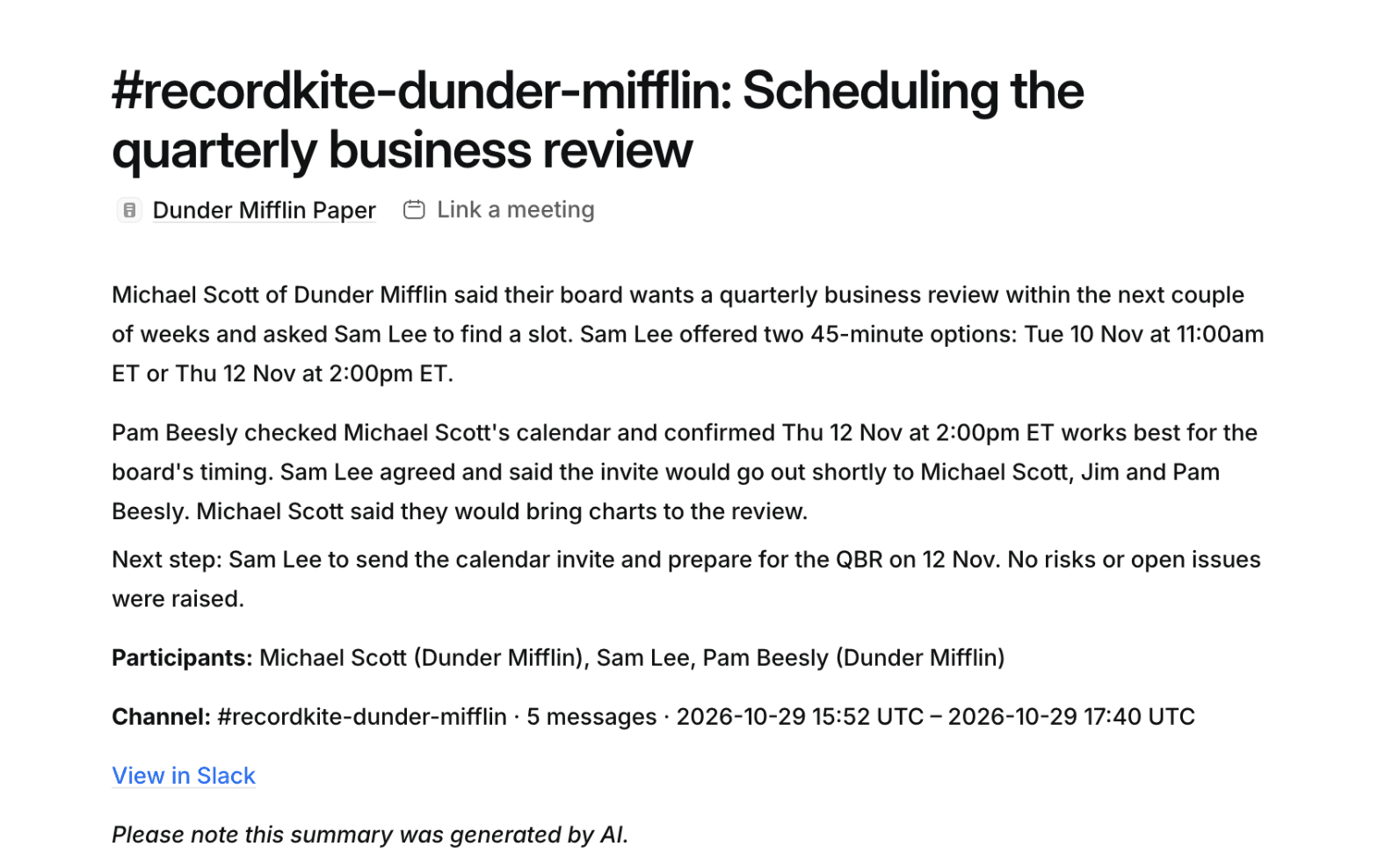
There's a 2-minute demo video if you'd like to see it in action, and a step-by-step setup guide on the Recordkite blog.
Pros
- Logs every conversation in mapped channels, with no one needing to remember.
- One readable entry per conversation, with an AI summary and next steps.
- Matches channels to companies and people to Attio people for you, and asks when it isn't sure.
- Keeps a Last Slack interaction date on companies, people and deals.
Cons
- It's a paid product, priced per Attio workspace by the number of channels, starting at $79 a month for up to 10 channels.
- It only logs Slack Connect channels. Direct messages and internal channels aren't logged.
- The Activity timeline needs Attio Pro or Enterprise (notes and Last Slack interaction work on every plan).
Best for: teams who work with many customers in shared Slack channels and want every conversation on the right Attio record without building or maintaining anything.
Option 3: Build a workflow with Zapier, Make or n8n
If you already use an automation tool, you can build a workflow that watches a Slack channel and writes what's said to Attio. The basic shape is the same in every tool:
- Trigger on a new message in the shared channel.
- Find the Attio record the channel belongs to.
- Write a note (or an activity) to that record.
- Optionally summarise the message with an AI step, and update a Last Slack interaction attribute.
Here's what each tool offers for the Slack and Attio steps:
| Tool | Slack trigger | Writing to Attio |
|---|---|---|
| Zapier | New Message Posted to Channel (or New Message Posted to Private Channel) | Attio's Create Note action writes a note to a record. Update Record can set a Last Slack interaction date. |
| Make | Slack's watch modules for public or private channel messages | Make's Attio app has no note module yet, so use Make an API Call to send the note to Attio's notes API. |
| n8n | Slack Trigger node, on new messages posted to a channel | There's no built-in Attio node, so use the HTTP Request node with Attio's notes API, or a community Attio node. |
A basic Zap looks like this: Slack: New Message Posted to Channel → Attio: Create Note, with the note's parent set to the customer's company record, the title set to the channel name and date, and the content set to the sender's name, the message text and its permalink.
Shared channels can be set up as public or private on your side, so pick the matching Slack trigger. Before you rely on the workflow, post a test message from the customer's side of the channel and check it comes through.
What you'll need to solve
A one-step "message to note" workflow is quick to build, but it doesn't get you very far. To make it useful, you'll run into a few problems:
- One note per message. Every message, including "thanks" and replies in threads, becomes its own note. Grouping messages into conversations means storing them somewhere and writing them out later, which is hard in Zapier and Make and needs a database or data store in n8n.
- Which record? The simplest approach is one workflow per channel, with the company's record ID hard-coded. With many channels you'll want a lookup table that maps each channel to a company, and someone has to keep it up to date.
- Which people? Linking the customer's people to the note means looking up each Slack user's email (where Slack shares it) and searching Attio for a matching person.
- Summaries. An AI step (for example ChatGPT or Claude in your automation tool) can summarise messages, but per-message summaries aren't much more readable than the messages themselves. Check how your AI provider handles customer data before you send it conversations.
- Edits and deletions. If a message is edited or deleted in Slack, the note in Attio doesn't change unless you build that too.
- Cost and upkeep. Each message runs the workflow, often several tasks or operations at a time, so busy channels add up on Zapier and Make plans. And when an API, a channel or a person changes, the workflow needs fixing.
Pros
- Flexible: you decide exactly what's logged, where it goes and how it's formatted.
- Cheap to start if you already pay for Zapier, Make or n8n, and n8n can be self-hosted.
- Works with any Attio plan for notes and attributes.
Cons
- Logs messages, not conversations, unless you build the grouping yourself.
- Matching channels and people to Attio records is manual or needs extra work.
- Someone on your team owns the workflow and fixes it when it breaks.
- Usage-based pricing can grow quickly in busy channels.
Best for: teams with an automation builder on hand, a few important channels, and a need for a custom flow, such as posting only messages with a certain emoji or keyword to Attio.
Option 4: Use Pylon
Pylon is a customer support platform for B2B companies. It turns messages in your shared Slack channels (and email, chat and other channels) into support issues, with a helpdesk, SLAs, AI agents and reporting on top. It also has an Attio app.
What the Attio integration does
- Daily conversation summaries. Once a day, Pylon scans your customer channels, summarises each conversation with AI and adds it as a note, with a link to the Slack conversation, on the matching company in Attio.
- Contacts. When someone new joins a customer channel, Pylon can create them as a person in Attio.
- Field sync. Companies, people and attributes can sync between Attio and Pylon in both directions, so you can filter issues in Pylon by Attio fields.
Pros
- If you already use Pylon for support, logging to Attio comes with it.
- AI summaries rather than raw messages, on the right company.
- You also get a full support tool: issue tracking, SLAs and reporting across your shared channels.
Cons
- It's a full B2B support platform. If all you want is your Slack conversations in Attio, you're rolling out, paying for and running a helpdesk to get it. Your team has to work in Pylon, and your customer channels get set up as support channels.
- It's priced per seat, from $89 per seat per month on an annual contract at the time of writing, plus usage-based credits.
- Summaries arrive once a day, not as conversations happen.
- Summaries go on the company as notes. Pylon's Attio docs don't mention activities on the timeline, a last-contact date or logging to deals.
Best for: teams who already use Pylon, or want a B2B support platform anyway, and see Attio logging as a bonus.
Side-by-side comparison
| Copy and paste | Recordkite | Zapier, Make or n8n | Pylon | |
|---|---|---|---|---|
| Setup | None | About 15 minutes, plus an onboarding call | Hours to days, per workflow | Rolling out a support platform, then connecting Attio |
| Ongoing effort | High: someone logs each conversation | Low: map new channels as you add them | Medium: maintaining workflows and mappings | Low for logging, but your team works in a new support tool |
| Coverage | Only what people remember | Every conversation in mapped channels | Every message in channels you've set up | Conversations in customer channels |
| What lands in Attio | Whatever is written | A note per conversation, plus an activity on Pro and Enterprise | A note per message, unless you build grouping | A daily summary note per conversation, on the company |
| AI summaries | Written by hand | Built in | Possible with an extra AI step | Built in |
| People and deals | Only if added by hand | Matched automatically | Needs extra lookups | Creates people from channel members; deals not mentioned |
| Last Slack interaction | Updated by hand | Built in | Possible with an extra step | Not mentioned in its docs |
| Cost | Your team's time | From $79 a month per workspace | Your automation plan, which grows with message volume | From $89 per seat a month, billed annually, plus credits |
Which option should you choose?
- You have a few shared channels and only need the big moments in Attio: start with copy and paste, and a consistent note template.
- Shared channels are where you work with customers, across many accounts: a dedicated app like Recordkite saves the build and the upkeep, and gives you summaries rather than raw messages, without adopting a support platform.
- You have an automation builder, a few key channels and a specific flow in mind: a Zapier, Make or n8n workflow gives you full control, as long as someone owns it.
- You already use Pylon for support, or want a B2B support platform anyway: turn on its Attio integration and you'll get daily summary notes on your companies.
Frequently asked questions
Does Attio have a Slack integration?
Yes. Attio's Slack app posts record and list changes to channels, sends messages from workflows and lets you ask Attio questions by tagging @Attio. It can't read the messages in your channels, so it doesn't log Slack conversations in Attio.
Can Zapier send Slack messages to Attio?
Yes. Use Slack's New Message Posted to Channel trigger with Attio's Create Note action. Each message becomes its own note, so you'll need extra steps if you want messages grouped into conversations or summarised.
Does Pylon log Slack conversations in Attio?
Yes, as part of its Attio integration. Once a day, Pylon adds an AI summary of each conversation in your customer channels as a note on the matching company. It comes with Pylon's support platform, so it suits teams who use Pylon for support anyway.
Can I update Attio's Last interaction from Slack?
No. Attio's Last interaction is calculated from emails and meetings, and apps and workflows can't change it. Create your own date attribute, such as Last Slack interaction, and update that instead.
Can I log Slack direct messages in Attio?
Copy and paste works for anything you can see. Automation tools can trigger on some direct messages, but logging other people's DMs raises obvious privacy questions. Recordkite only logs shared Slack Connect channels, not DMs.
Is it safe to send customer conversations to an AI tool?
It depends on the provider. Check whether they keep your data or use it to train models, and where it's processed. Recordkite only uses AI endpoints with zero data retention, and if you build your own workflow, check the settings of the AI step you use.
Wrapping up
Getting customer Slack conversations into Attio fills a big gap in your customer relationship history. Copy and paste costs nothing but relies on people remembering. A dedicated app like Recordkite does it for you, conversation by conversation, with summaries on the right records. A Zapier, Make or n8n workflow automates it if you're willing to build and maintain it. Pylon does it as part of a full support platform.
Whichever you choose, the result is the same: anyone who opens a customer's record in Attio sees the whole story, not just the emails.