Term sheets and LP documents from your Attio records
VC funds generate term sheets, capital call notices and LP commitment letters from Attio with the DocuPotion app, then send them for e-signature without leaving the record.
VC funds that run deal flow and fundraising in Attio use the DocuPotion Attio app to generate term sheets, capital call notices and LP commitment letters from their records, send them for e-signature, and file the signed copy back on the record. Attio has no built-in document generation, so the alternative is copying the company name, amount and valuation from the deal into last month's term sheet by hand. That works for one deal a quarter, not for a capital call to 40 LPs. The full setup is in our guide to generating documents from Attio.
The documents a VC fund creates from Attio
Each one is a template filled from an Attio record: Deals, Companies, People, or custom objects like LPs, Managed Funds or Investor Commitments.
Term sheet
From: Deals
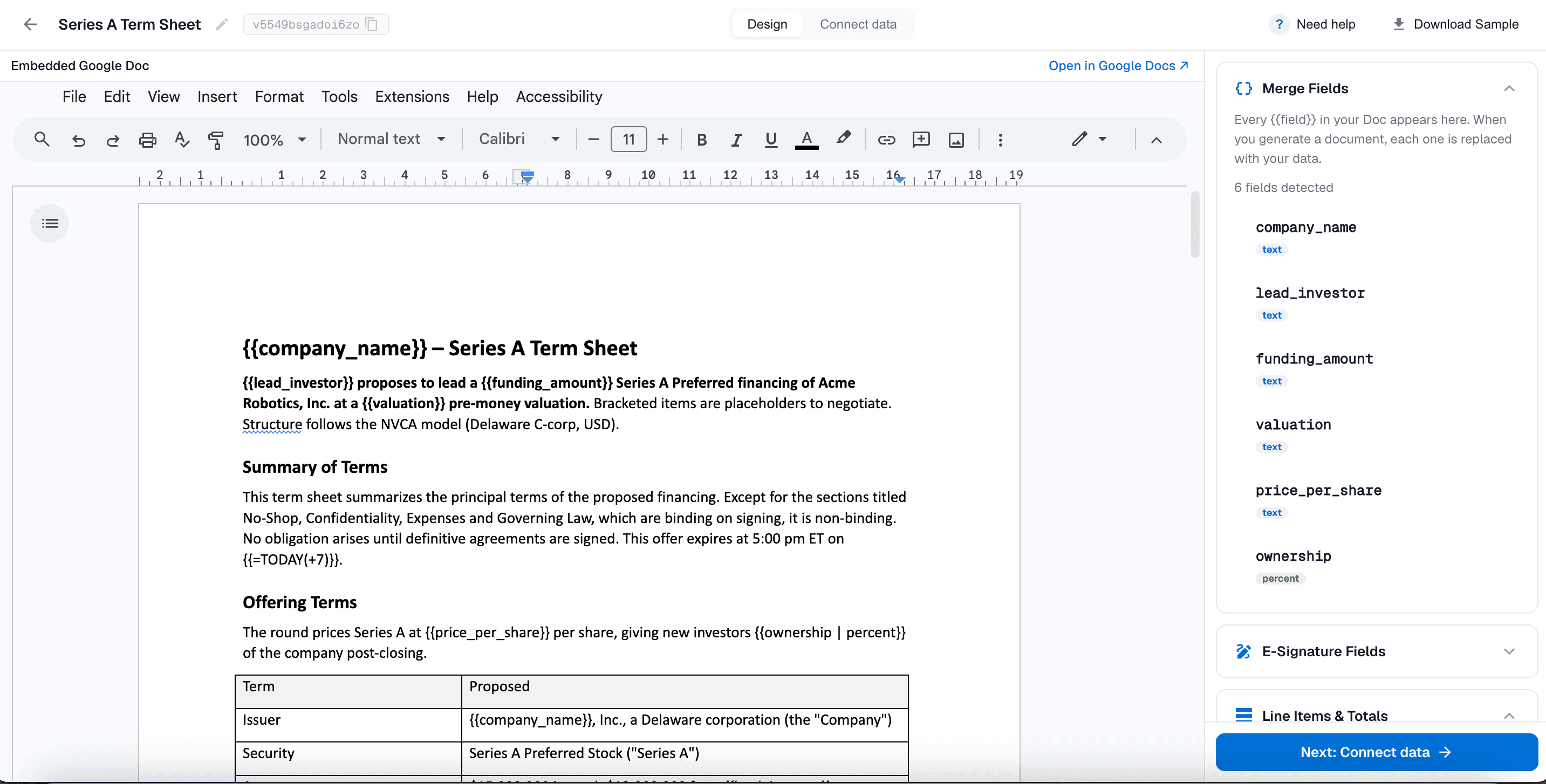
Your fund's standard term sheet, filled from the deal: company, round, investment amount, pre-money valuation, board seat and pro rata rights. Sent for signature to the founders and the deal partner.
NDA
From: People or Companies
A mutual NDA for a co-investor, or a confidentiality agreement for a prospective LP before they see the fund deck. Names and addresses come from the record.
Custom object
Capital call notice
From: Investor Commitments
One notice per LP, with their commitment, the amount called, the due date and wire details. Add a custom Investor Commitments object; add attributes for the amount called, due date and wire details.
Custom object
LP commitment letter
From: LPs or Investor Commitments
A welcome or confirmation letter when an LP commits, sent automatically when the commitment is recorded in Attio.
How VC funds generate documents from Attio
Three steps. You set up each document once, then anyone on the team creates it from a record in a few clicks.
1
Turn your existing document into a template
Start from the term sheet or notice you already use, as a Google Doc or an existing PDF. Add merge tags such as {{company_name}} and {{valuation}} where Attio data should go, and signature tags for each signer.
2
Map the tags to Attio attributes
In a DocuPotion automation, pick the Attio object: Deals for a term sheet, Investor Commitments for a capital call. Then point each tag at an attribute. Mapping reaches one hop into related records, so a deal can pull its company's legal name.
3
Create the document from the record
Open the record in Attio and click Create document, or let an Attio workflow do it with DocuPotion's Generate document step. The document is attached to the record, and if it needs signing, each signer gets an email and signs in the browser.
When DocuPotion fits a fund, and when it does not
DocuPotion fits funds that send the same kinds of documents again and again from data that already lives in Attio: first-draft term sheets on your standard form, NDAs, capital call notices and LP commitment letters. It is priced per Attio workspace with unlimited users, so every partner, associate and the ops lead can use it for one price.
It is not a negotiation tool. Once counsel starts redlining a term sheet in Word, finish that round there, or update the terms in Attio and generate a fresh version. LPAs and subscription documents belong with fund counsel and your fund administrator, and DocuPotion does not host data rooms (Papermark and similar tools do). If you want a drag-and-drop proposal editor, PandaDoc's Attio app is the stronger choice.
✓
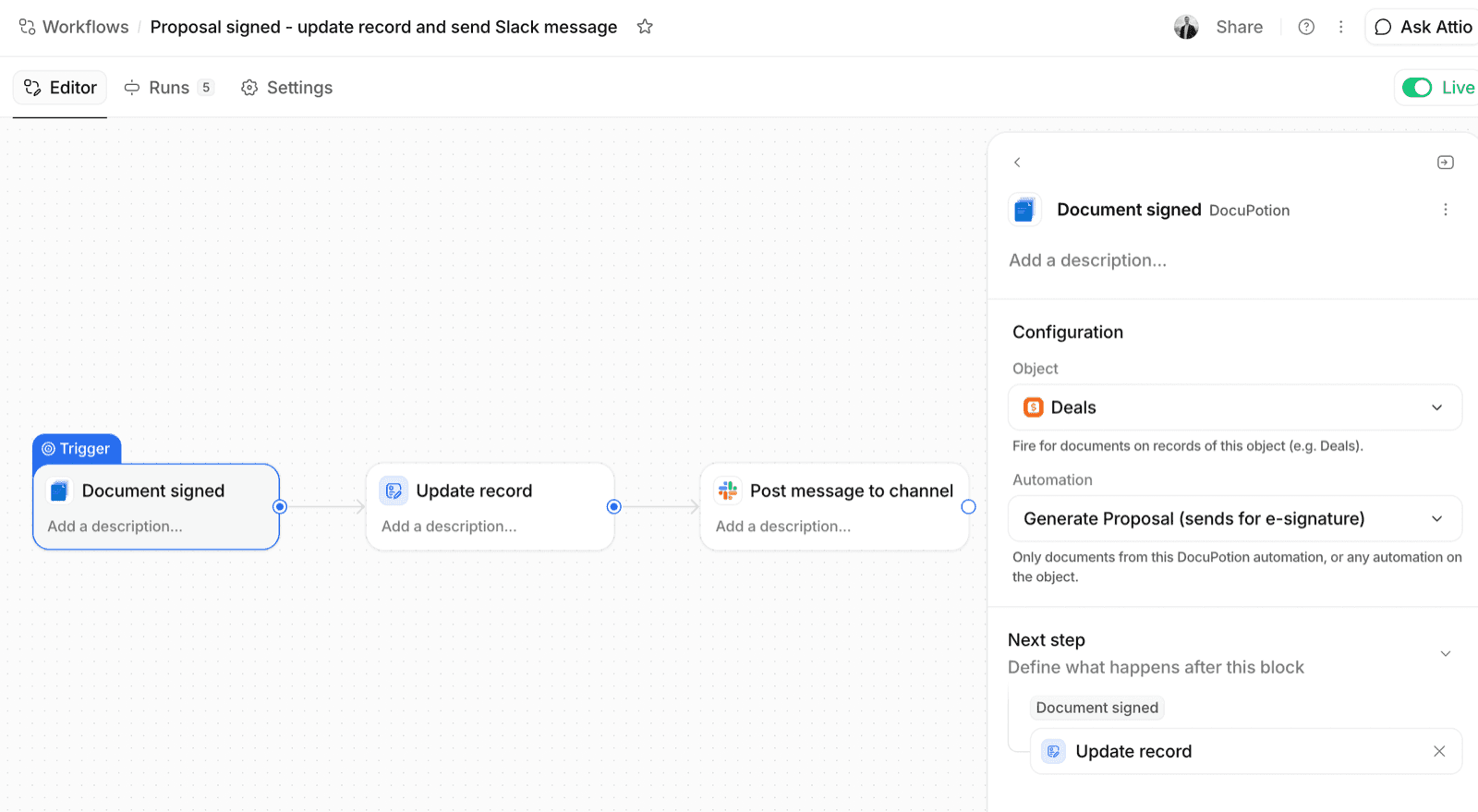
Workflow triggers. Document sent for signature and Document signed are Attio workflow triggers. A signed term sheet can move the deal to its next stage and post to Slack, with no webhooks.
✓
E-signatures included. No per-envelope fees. A capital call sent to 40 LPs uses 40 documents, not 40 envelopes on top.
✓
Signed copy on the record. The sealed, signed document is filed back on the Attio record and emailed to every signer.
Signatures collected through DocuPotion comply with the ESIGN Act and UETA in the US and qualify as electronic signatures under eIDAS in the EU. Have your counsel approve each template before you use it.
Apps for VC deal documents in Attio
What each tool does for a fund that runs on Attio. Last updated: November 2026; competitor details as of November 2026.
Tool
Main job
Generates from Attio records
E-signature
Works inside the Attio record
DocuPotion
Documents and e-signature
Yes
Yes
Yes
PandaDoc
Proposal editor and e-signature
Yes
Yes
Yes
DocuSign
E-signature
Via automation tools
Yes
No
Papermark
Data rooms and view tracking
No
NDA gate
No
Zapier, Make or n8n + Google Docs
Build-it-yourself automation
Yes
No
No
Frequently asked questions
How do VC funds generate term sheets or LP documents from Attio?
They use the DocuPotion Attio app. First, turn your existing term sheet, capital call notice or LP commitment letter into a template. Then map its fields to Attio attributes on Deals, Companies or custom objects such as LPs and Investor Commitments. Anyone on the team clicks Create document on the record, or an Attio workflow does it. DocuPotion can send the document for e-signature and files the signed copy on the record.
What are the best apps for deal documents in Attio for venture capital?
For generating and signing documents from Attio records, use DocuPotion: it is built for Attio, includes e-signatures with no per-envelope fees, and is priced per workspace. PandaDoc has an Attio app built by Attio (as of November 2026) and is the better pick if you want a full document editor. Papermark covers data rooms, and DocuSign connects through automation tools such as Zapier or Make if your fund already pays for it (as of November 2026).
Can Attio create term sheets on its own?
No. Attio tracks the deal, the company and the people, but it has no built-in document generation or e-signature. You need an app such as DocuPotion to turn a deal record into a term sheet.
Can I generate a capital call notice for every LP at once?
Yes, with an Attio workflow. Store each LP's commitment and the amount called on their Investor Commitments record, and add a workflow that runs when the call is recorded, with DocuPotion's Generate document step. Each LP gets their own notice, attached to their own record.
Can I use our law firm's term sheet template?
Yes. Upload it as a PDF, or copy it into a Google Doc and add merge tags where deal data goes. The wording stays exactly as counsel wrote it; only the tagged fields change per deal.
Can I use Zapier, Make or n8n instead?
You can connect Attio to Google Docs through Zapier, Make or n8n and build document generation yourself, but you maintain that automation and still need a separate e-signature tool. The DocuPotion Attio app does both from the record, with no middleware.
How much does DocuPotion cost for a fund?
DocuPotion is priced per Attio workspace with unlimited users. Core is $49 a month billed monthly ($39 a month billed annually) for 100 documents and 10 templates. Business is $149 a month billed monthly ($125 billed annually) for 500 documents and unlimited templates. E-signatures are included on both, and it works on any Attio plan, including the free plan. Start with a free trial, no credit card required.