Mail merge to PDF, without the Word workaround

Generate individual, on-brand PDFs from a spreadsheet or your existing data using one reusable template. No copy-paste, no fragile Word merge.

50 free documents No credit card Set up in minutes
Your data
Name
Email
Plan
PDF
Dear Maria,
Mail merge is the classic way to turn a list of records into documents, but the built-in Word and Google Docs versions are painful for PDFs: you merge into one long file, then fight to split it into separate documents, and redo the whole thing whenever the template changes. DocuPotion runs the merge from a reusable template and gives you an individual PDF per record, and you can trigger it on demand, through the REST API, or automatically with Zapier or n8n.

Here's how it works

From a list of records to a finished PDF for each one.

1

Bring your data

Start with a spreadsheet, a database, Airtable, or any source that holds your records. Each row becomes one document.

2

Build your reusable template

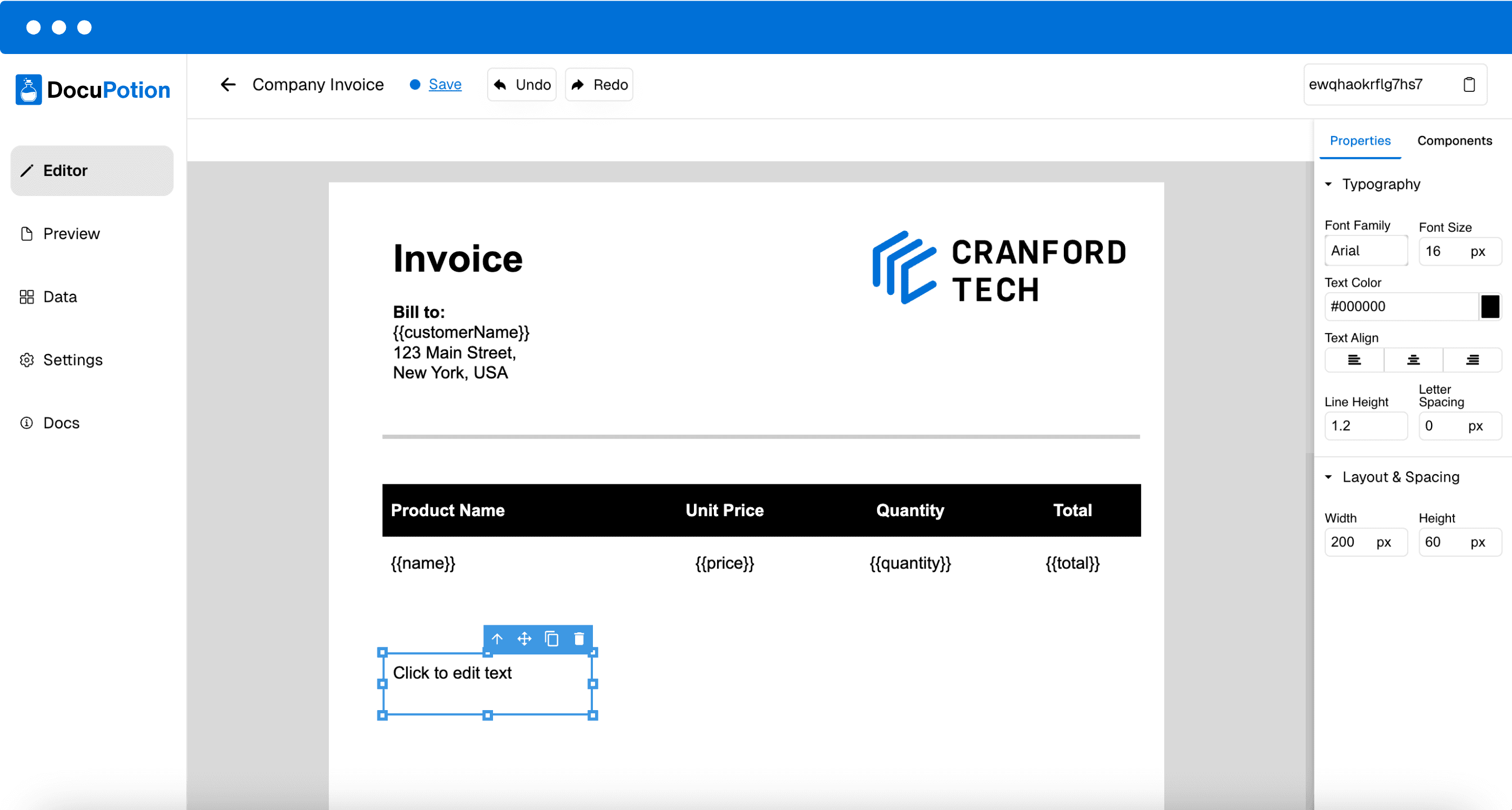
In DocuPotion, build a reusable template and add merge fields like {{name}} or {{date}}. Design a template from scratch with our AI-powered editor, or upload one of your existing documents.

3

Generate a PDF per record

DocuPotion fills the template for each record and returns a separate, finished PDF. Run it on demand, through the API, or automatically with Zapier or n8n.

Designing a reusable PDF template with merge fields in DocuPotion

Frequently asked questions

Can I mail merge to separate PDF files instead of one combined document?

Yes. DocuPotion creates a separate PDF for each record, so you get individual files rather than one long merged document you have to split up afterwards.

Do I need Microsoft Word or Google Docs?

No. You build the template in DocuPotion and merge your data straight in, so you can skip Word and Google Docs mail merge entirely.

What can I use as the data source?

A spreadsheet such as CSV, Excel or Google Sheets, a database, Airtable, or data sent through the API. Each row populates one PDF.

Can I run the mail merge automatically?

Yes. Trigger it through the REST API, or with Zapier or n8n, so your PDFs generate on a schedule or whenever your data changes.

Can I generate a large batch of PDFs at once?

Yes. DocuPotion is built for volume, so you can generate hundreds or thousands of individual PDFs from a single template and data set.

Can I match the PDFs to my branding?

Yes. DocuPotion templates use your own logo, colours, fonts and layout, so every generated PDF is on-brand and consistent.

Mail merge to PDF without the busywork

Build your template once and generate an individual PDF for every record. Start free with 50 documents, no credit card required.

Start free trial