Auto fill a PDF form from Excel

Upload the PDF form you already use and the spreadsheet holding your data. DocuPotion matches your columns to the form fields and gives you back one completed PDF for every row.

50 free documents No credit card Set up in minutes
Your data
Name
Date
Amount
PDF form
Full name
Maria Alvarez
Date
04/07/26
Amount
$1,240
Address

If you retype the same PDF form for every row of a spreadsheet, DocuPotion can do the whole batch for you. Upload your existing PDF, upload an .xlsx or .csv file, check that each column is pointing at the right field, and generate. You get one filled PDF per row, downloadable individually or as a single zip. There is no Excel macro to write, no XML schema to map, and no automation platform to sign up for first. If your data lives somewhere other than a spreadsheet, see automated PDF form filling instead, and if your document is a template you design rather than a form you were given, see PDF mail merge.

Try it on a real form

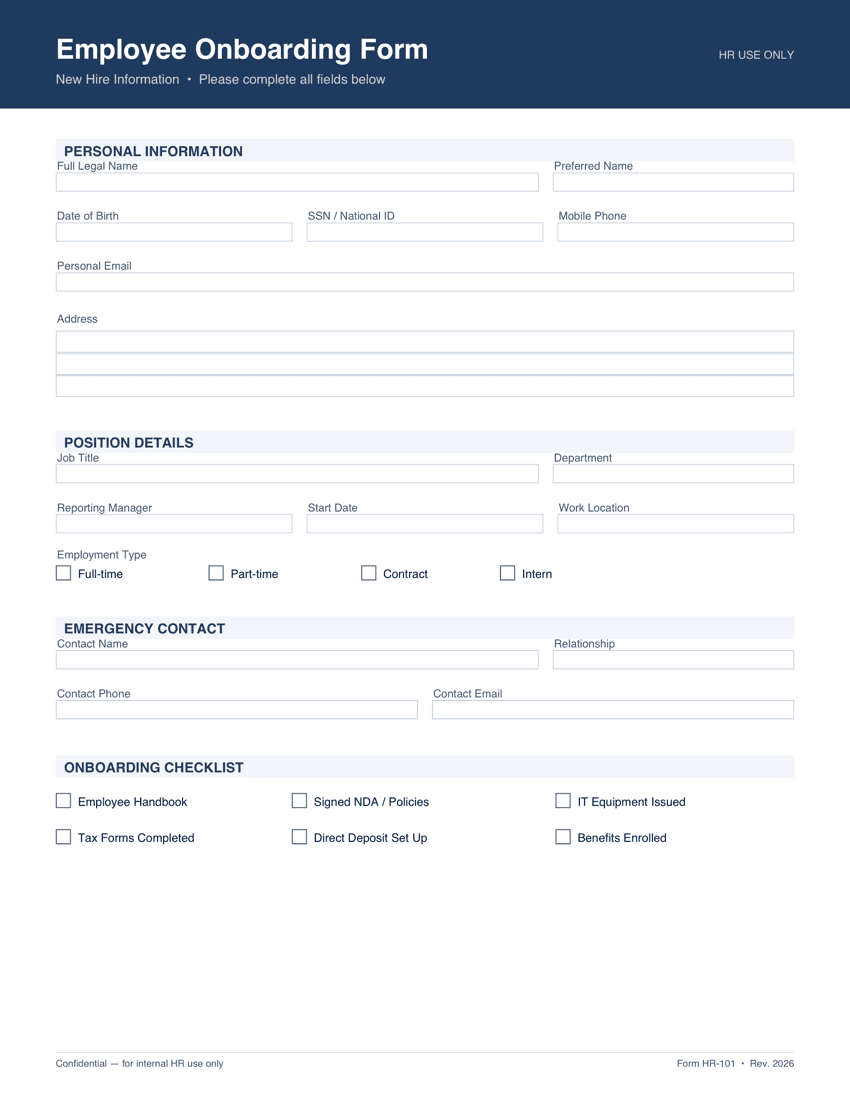
A blank employee onboarding PDF and a spreadsheet of five new starters. Switch the preview between the mapped merge fields and a filled copy, then run the batch and download the real PDFs.

The PDF exactly as it was uploaded, with every field still empty.

The blank Employee Onboarding Form PDF before any data is applied

How to auto fill a PDF form from Excel

Three steps from a blank form and a spreadsheet to a folder of completed PDFs.

1

Upload the PDF form you already use

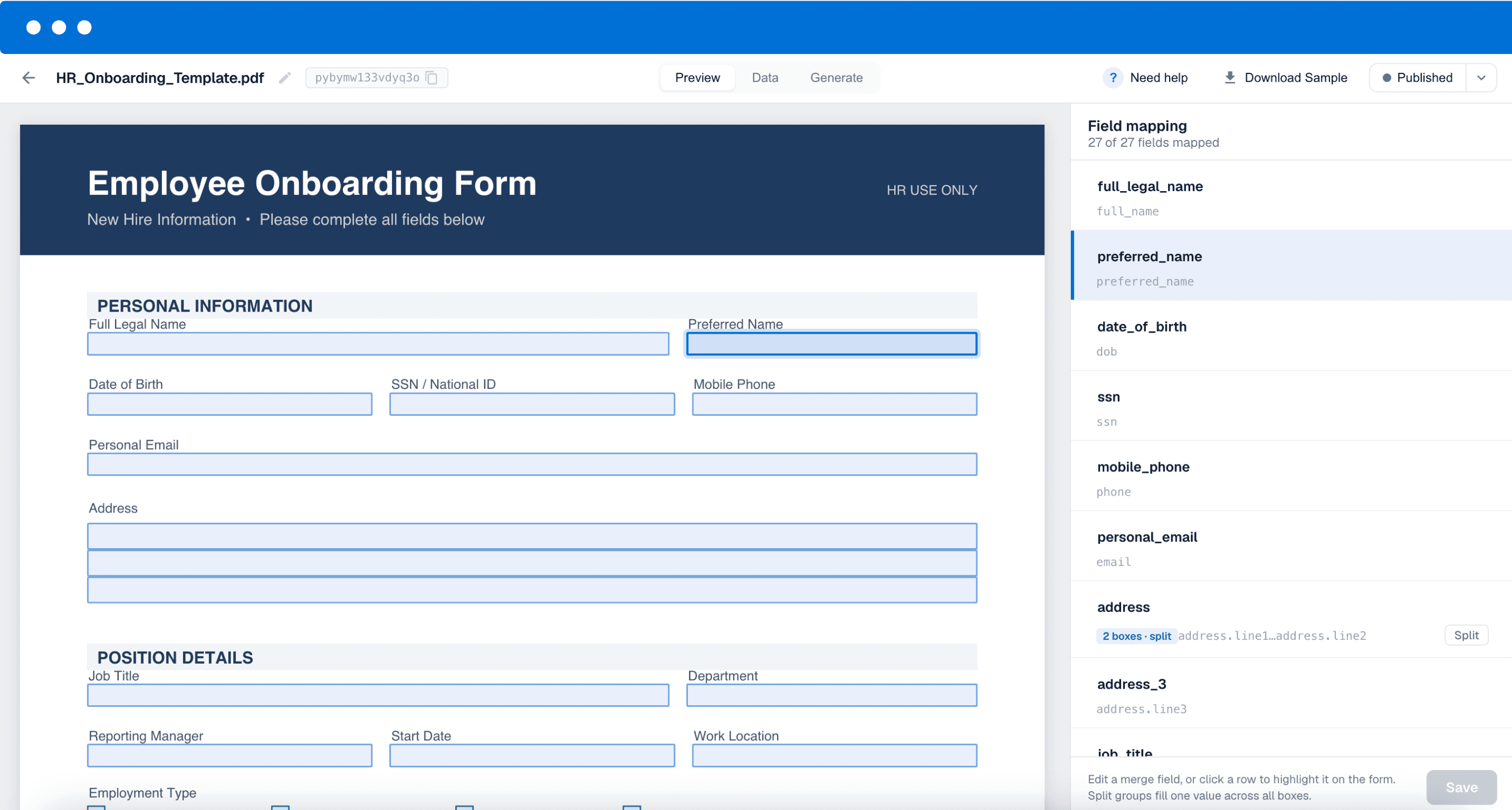
Drop in the PDF as it is. If it is a fillable form, DocuPotion detects every text field, checkbox and text area and turns each one into a named merge field. If it is flat or scanned, you can drag text, checkbox and image elements straight onto the page instead. Either way the original layout, fonts and fixed wording stay untouched, which matters when the form is one you are not allowed to redesign.

2

Upload your Excel file and check the mapping

Upload an .xlsx or .csv file of up to 5,000 rows. DocuPotion matches your column headers to the form's merge fields by name and shows a sample value from your first row next to each pairing, so you can see at a glance that “Client Name” landed on the right field. Anything it guesses wrong you fix with a dropdown.

3

Generate and download the batch

Set a file naming pattern from your merge fields, so you get invoice-1042-acme.pdf rather than a folder of numbered files. Then generate. DocuPotion fills one PDF per row with live progress and you download them one by one or as a single zip.

DocuPotion detecting the form fields in an uploaded PDF and mapping them to merge fields

Frequently asked questions

How do I auto fill a PDF form from Excel?

Upload your PDF to DocuPotion so it can turn the form's fields into merge fields, then upload your Excel file from the Generate tab. DocuPotion matches your spreadsheet columns to the merge fields by name, you confirm or correct the pairings, and it produces one completed PDF for every row in the sheet. The full walkthrough is in the help doc on creating documents from a spreadsheet.

Does my PDF need to be a fillable form?

No. Fillable PDFs are quicker because DocuPotion detects the existing form fields automatically, but flat and scanned PDFs work too. For those you drag text, checkbox and image elements onto the page yourself and point each one at a column in your spreadsheet. You can also mix the two, which is useful when a real form is missing something like a logo or a signature slot. Only fully dynamic Adobe LiveCycle and XFA forms are rejected.

What spreadsheet formats and sizes are supported?

DocuPotion accepts .xlsx and .csv files up to 20 MB and 5,000 rows per upload. If your sheet is larger, split it and run the batches one after another. Generated documents stay available in your account for 12 months.

How many documents can I generate?

A single run handles up to 5,000 rows, and your plan sets how many documents you can generate per month. The free trial includes 50 documents with no credit card, which is enough to prove the mapping works on a sample of your sheet before you run the full batch. See pricing for the monthly allowances.

How are checkboxes filled from a spreadsheet?

Checkboxes read true and false values from your column. Put TRUE in the cell to tick the box and FALSE to leave it clear, so your spreadsheet drives the ticks without anyone clicking through the form.

Can I name the output files from my spreadsheet?

Yes. You set a naming pattern built from your merge fields before the run starts, so files come out as something like acme-invoice-1042.pdf instead of a numbered list you then have to sort through.

Does the finished PDF keep the original layout?

Yes. You are reusing the exact PDF you uploaded, so the layout, fonts, logos and fixed legal wording are unchanged. DocuPotion only populates the fields and overlays you mapped, which is what makes this safe for official forms that have to be submitted verbatim.

Fill your PDF forms from a spreadsheet

Upload your form, upload your Excel file, and download the finished batch. Start free with 50 documents, no credit card required.

Start free trial