Inspection reports, safety forms and work tickets from your form data
Keep the form tool and the PDF forms your team already uses. DocuPotion fills your inspection report, safety form or work ticket with each submission, keeping the layout exactly.
To create inspection reports from form data automatically, upload the inspection report you already use as a PDF template. Then connect the form your inspectors fill in with Zapier, Make, n8n or our REST API. Each submission fills your PDF with the answers, photos and inspector's details, and the layout stays exactly as it is. No PDF yet? Build the report from a Google Doc or describe it to our AI template editor.
Each one starts from a PDF you already use. You set it up once, then every new submission fills it with that job's answers.
From: Your inspection form or spreadsheet
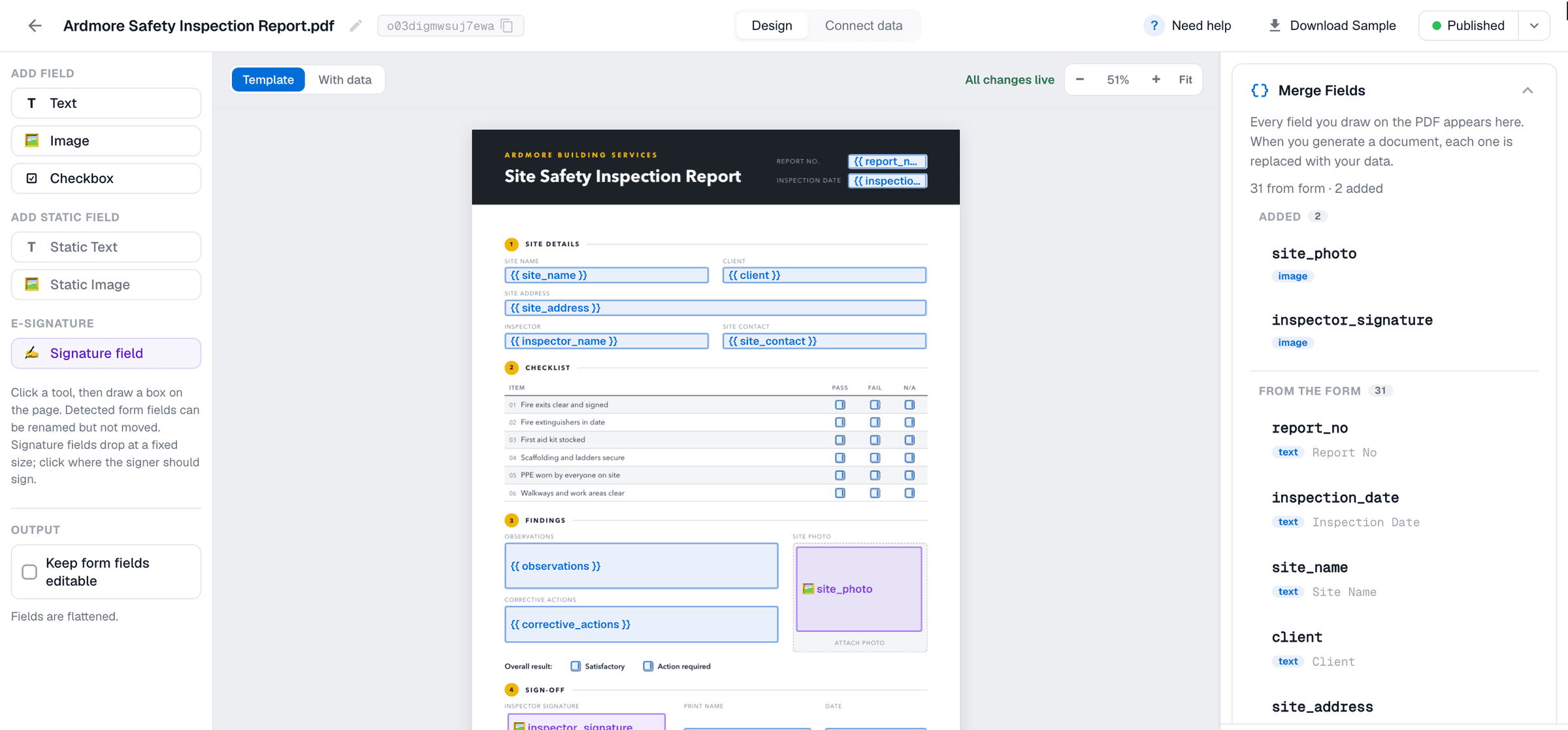
Upload the inspection report or checklist you already use as a PDF. In a fillable PDF, DocuPotion detects the form fields and uses AI to map each one to a merge field. Image fields show each site's photos.
From: Your safety form submissions
Some forms can't change: a client's permit to work, an insurer's checklist, a regulator's template. Upload the PDF and DocuPotion fills it exactly, keeping every line of the original layout. Text, checkbox and image fields go wherever the answers belong.
From: A job form or your job system
A one-page ticket for each job: customer, address, work done, parts used, hours and the technician's notes. Upload the ticket you use today as a PDF. If it lists parts line by line, build it from a Google Doc instead, as PDF templates don't support line items.
You set up the report once, then every submission becomes a finished document.
Upload the inspection report, safety form or work ticket you already use as a PDF. In a fillable PDF, DocuPotion maps each form field to a merge field such as {{site_address}}. On a flat PDF, you place text, image and checkbox fields where the answers go. No PDF yet? Bring a Google Doc or describe the report to the AI template editor.
Use Zapier, Make or n8n to pick up each new submission from Jotform, Google Forms, Typeform or the form tool you already use, and pass the answers to DocuPotion. If your submissions land in your own system, call the REST API instead.
DocuPotion fills your PDF and returns the finished document. The same workflow emails it to the client, saves it to Google Drive or files it wherever your team keeps reports.


DocuPotion fits teams that already have their report or form as a PDF, and collect the answers in a form tool, a spreadsheet or their own system. You keep both and add the finished document at the end. It's the better choice when a client, insurer or regulator hands you a PDF form that must be used word for word, or when your report already looks the way you want.
If your team is still on paper and has no form tool yet, start with an all-in-one inspection app such as Mitti (formerly SafetyCulture) or GoCanvas. They give inspectors a mobile checklist app and produce the report in the same product. DocuPotion doesn't make a mobile form app, and it isn't the place to schedule inspections or track corrective actions.
Your PDF form, filled exactly. Upload a flat or fillable PDF. In a fillable PDF, DocuPotion detects the form fields and uses AI to map each one to a merge field.
Priced per document, not per inspector. Every plan includes unlimited team members. Core is $49 a month for 100 documents.
Bulk from a spreadsheet. Upload a .csv or .xlsx of last month's inspections and DocuPotion generates one document per row, with no automation tool needed.
| Tool | Main job | Best for |
|---|---|---|
| DocuPotion | Fills your existing PDF forms from form, spreadsheet or API data | Teams that already have their forms as PDFs and collect the answers in another tool |
| Mitti (formerly SafetyCulture) | Mobile inspection checklists and frontline operations | Teams starting from paper who want inspections in one app |
| GoCanvas | Mobile forms and workflows for field teams | Field service teams replacing clipboards for inspections and work orders |
| Jotform | Form builder with a PDF Editor for responses | Teams who build their forms in Jotform and want a PDF of each response |
| Formstack Documents | Document generation from business data | Teams that want document generation from CRM, form or database data |
DocuPotion connects to your form through Zapier, Make or n8n. Pick whichever you already use. Each one turns a new submission into a finished document.
Use your form tool's trigger in Zapier, such as New Submission in Jotform, then add DocuPotion's Create a Document action.
See the Zapier appWatch for new responses in a Make scenario, then add the DocuPotion module. Good for routing reports to different people by site or result.
See the Make integrationStart from your form tool's trigger node or a webhook, then use the DocuPotion node. Good if you self-host or need branching logic.
See the n8n nodeUpload the inspection report you already use as a PDF template in DocuPotion, then connect your form to it with Zapier, Make, n8n or the REST API. Each new submission fills your PDF with the inspector's answers and photos, keeping the layout exactly. The same workflow can email the finished report or save it to Google Drive.
Yes. Upload it as a template. DocuPotion keeps the layout of the original PDF exactly and fills it with each submission's answers. Flat PDFs and the vast majority of fillable PDF forms are supported. Dynamic Adobe LiveCycle (XFA) forms are not supported at this time.
If your team already collects safety forms in a form tool, use DocuPotion. It fills your existing PDF safety form with each submission, exactly as it's laid out, or builds a branded report if you don't have a PDF yet. If you're starting from paper with no form tool, an all-in-one inspection app such as Mitti (formerly SafetyCulture) or GoCanvas gives you the mobile checklist and the report in one product.
Upload the work ticket you use today as a PDF, with merge fields for the customer, address, work done and hours. If the ticket lists parts line by line, build it from a Google Doc instead, as PDF templates don't support line items. Connect your job form to it with Zapier, Make or n8n. When the technician submits the form, DocuPotion generates the ticket and the workflow sends it to the customer or the office.
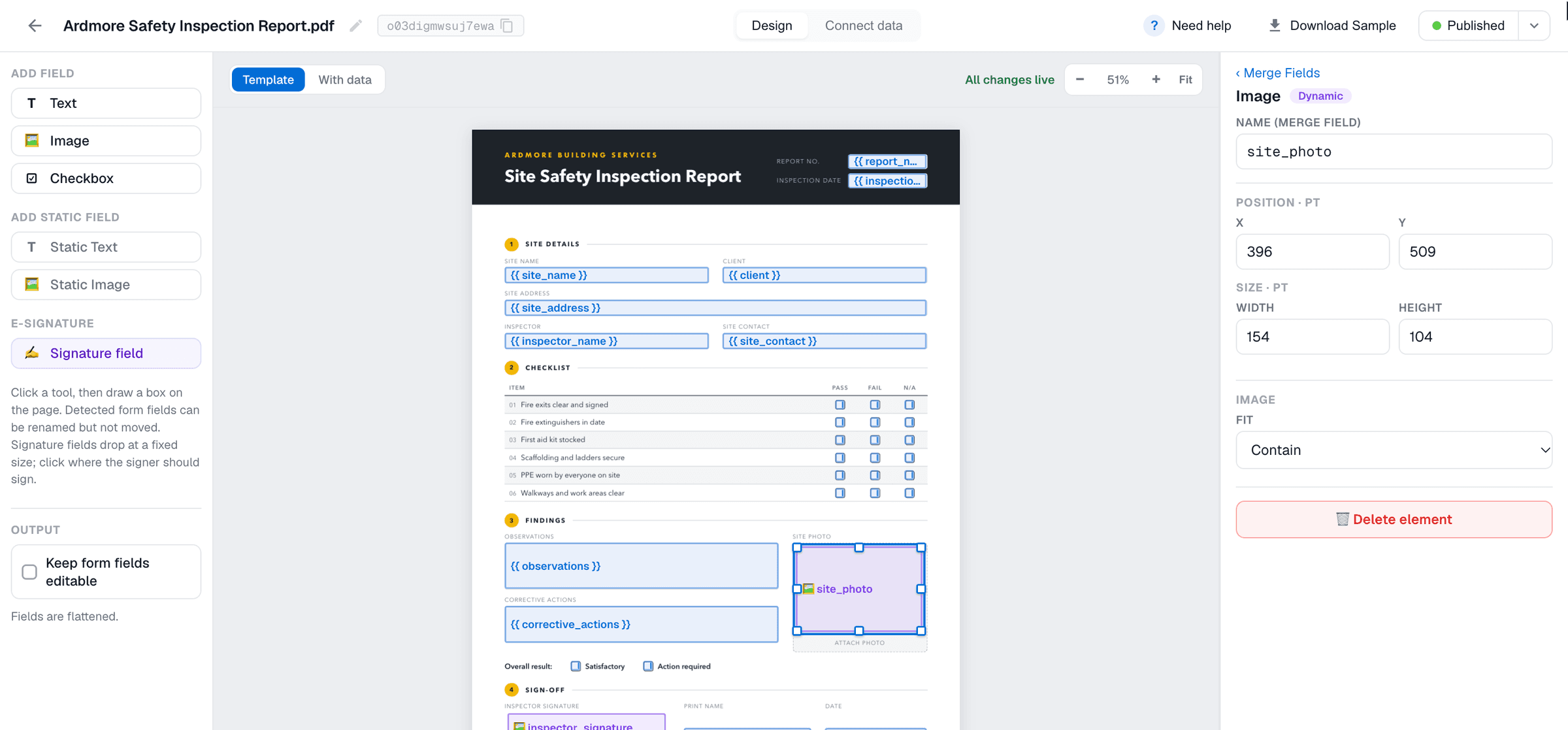
Yes. Add an image field to your PDF template where each photo should go. Image fields are filled from your data, so each report shows that job's photos. Your form tool needs to pass each photo as a link DocuPotion can open. Typeform, for example, includes file uploads as links in each submission.
Every plan includes unlimited team members and is priced by the documents you generate each month. Core is $49 a month for 100 documents and 10 templates. Business is $149 a month for 500 documents and unlimited templates. Start with a free trial, no credit card required. It includes 10 documents and 3 templates.
Turn an existing fillable or flat PDF into a template and fill it from your data.
Fill your PDF forms from your own system with the DocuPotion REST API.
The step-by-step guide to connecting a form or any other trigger to DocuPotion in Zapier.
Generate a document from every Google Forms response.
Upload the PDF form you already use and let every submission fill it. Free trial, no credit card required.